
Clinical trial results can be posted as a full data set and/or as a summary attachment, in line with the document Modalities and timing of posting or depending on whether the trial was completed or prematurely ended.
To post results click on a clinical trial displayed on your page and click on Post Results:
The following screen is displayed:
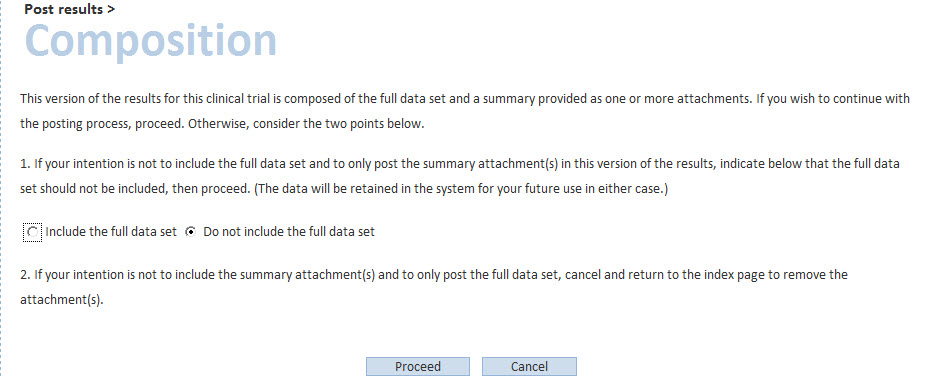
The user clicks on “include the full data set” if a summary attachment (pdf file) is not sufficient for the trial (i.e. in line with the document Modalities and timing of posting and if the trial was not “prematurely ended”). The user will be asked to accept the terms of agreement, and to click on “post”. The full data set for the trial has been posted.
Please note that, in order to post results as a full data set, data must be valid. If they are not valid, when you try to post them, error messages are displayed. Those error messages can be corrected through the validation rules (“rule description” column).
In case a trial never started or has partial results, the study is considered to be “prematurely ended”. In this case, the user clicks on “do not include the full data set”. The user will then answer “yes” to the question “has the trial prematurely ended?”, and will be able to post the summary attachment (i.e. as a pdf file), after having accepted the terms of agreement.
In case a trial is “completed” but the user chooses to “do not include the full data set” and to post the summary attachment only, the system will ask a few questions to verify whether this modality of posting is correct, in line with the document Modalities and timing of posting
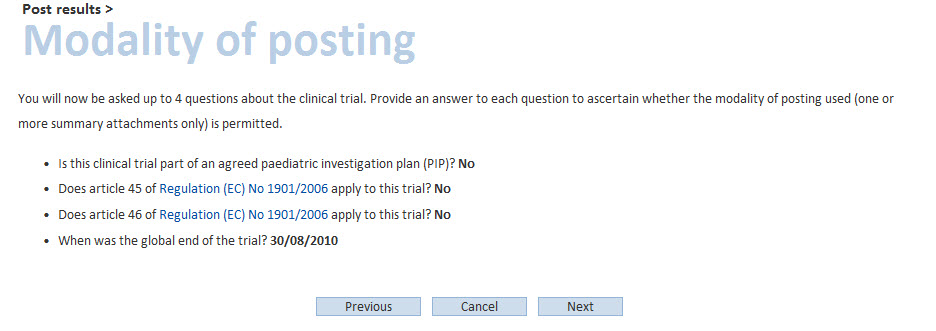
If all the answers provided are correct, the user will be able to post the summary attachment, after having accepted the terms of agreement.
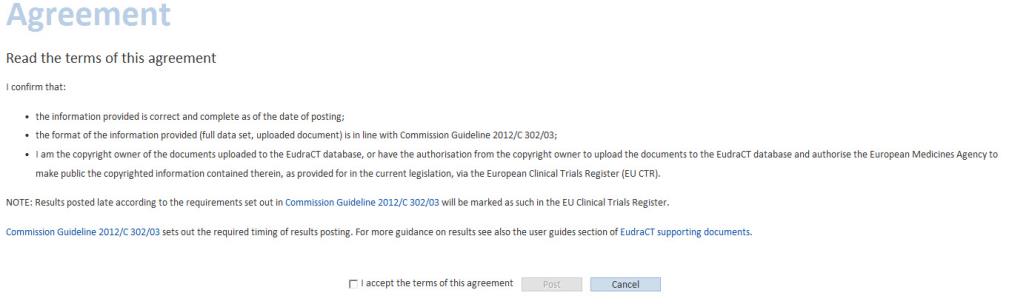
Terms of agreement, to be accepted in order to post results:
The following screen is then displayed:

The results have been successfully posted to EudraCT.
Related Topics: